
Our verdict:
Sewing and 5 x 7-inch embroidery
Best for garment makers who want construction sewing and larger motifs in one machine.
View at BrotherKeep in mind: switching between sewing and embroidery interrupts each workflow.
Buying guides
The short answer
The SE2000 suits garment sewing plus embroidery that needs a 5 x 7-inch field. Choose the smaller SE700 only when your designs already fit 4 x 4 inches.
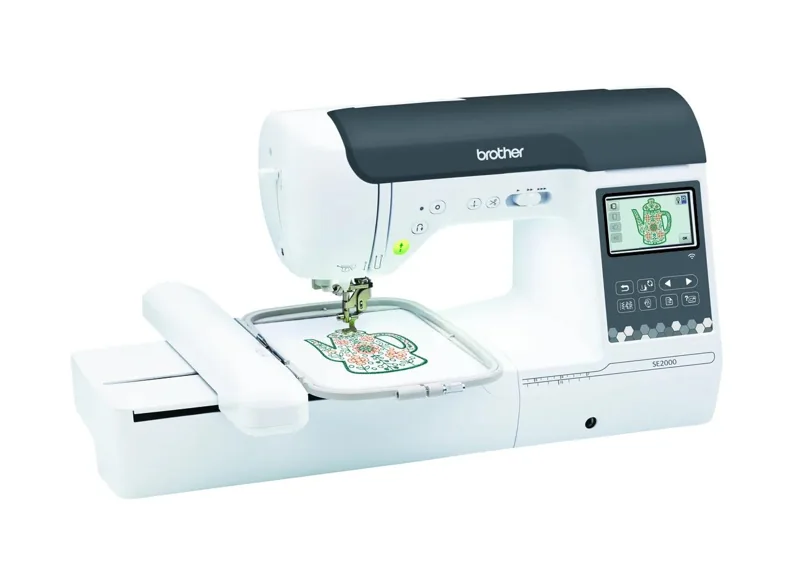
Brother SE2000View at BrotherRead our analysisThe Brother SE2000 combines ordinary sewing and automatic hoop embroidery. Its main purchase argument over a smaller combination machine is the 5 x 7-inch embroidery field. This review uses the manufacturer's specifications and exact catalog package.
Our verdict:
Sewing and 5 x 7-inch embroidery
Best for garment makers who want construction sewing and larger motifs in one machine.
View at BrotherKeep in mind: switching between sewing and embroidery interrupts each workflow.
The linked page describes Brother's SE2000. Check its current included hoops and accessories before buying supplies. An accessory hoop does not enlarge the maximum stitch field.
Brother lists 241 sewing stitches and 193 embroidery designs. The machine can construct a project in sewing mode and embroider it after the appropriate setup change. It suits a buyer who wants those functions in one desk footprint.
The 5 x 7-inch field is a concrete constraint and a concrete benefit. Compare a planned design's width and height with it before looking at accessory totals or built-in motifs.
Choose it for projects with designs that need more room than 4 x 4 inches, while keeping garment construction on the same machine. If you already have an ordinary sewing machine that you like, compare the embroidery-only PE900 too.
One combined machine still runs one setup at a time. Switching between a construction seam and embroidery requires following the manual for the unit, foot and other settings. That setup change is part of the ownership decision.
A design that exceeds 5 x 7 inches still needs a different field or a carefully planned multi-placement workflow. Extra hoops and downloadable designs cannot change that travel limit.
Neither the larger field nor the extra sewing stitches proves a performance advantage on those measures.
The SE700 offers sewing and a 4 x 4-inch embroidery field. Choose it if that smaller field already covers your intended designs. Our sewing and embroidery guide also compares other field shapes.
The SE2000 is a sound fit when you need construction sewing and a 5 x 7-inch field. Decide from actual projects and include the stabilizer, thread and practice work in your plan, even with a retailer starter package.
Our verdict:
Check the SE2000 starter kit
Best for garment makers who want construction sewing and larger motifs in one machine.
View at BrotherKeep in mind: switching between sewing and embroidery interrupts each workflow.
Return to machine buying guides or the sewing machine section.
Yes. It combines ordinary sewing functions, including 241 stitches, with automatic hoop embroidery.
No. The maximum field remains 5 x 7 inches. A multi-position workflow requires separate placements.
Choose by design size: SE700 has a 4 x 4-inch field and SE2000 has a 5 x 7-inch field. We do not claim a stitch-quality winner.